5 min read
ChatGPT as a copilot for Qlik users

By now, almost everyone has seen, heard or read something about ChatGPT over the past few months. The chatbot, developed by OpenAI, attracted 100 million active users within two months of its launch. The news was full of stories about students having the chatbot do their homework for them and other examples of people using ChatGPT to work smarter. But can you, as a Qlik user, also put ChatGPT to work? Yes. In this blog, Senior Consultant Lennaert van den Brink uses a number of examples to show how you can work even more efficiently with ChatGPT as your copilot.
How does it work?
Getting started with ChatGPT is actually very simple. Go to chat.openai.com and register as a user. You can use your Google or Microsoft account for this if you like. Once your account has been activated, you will land in a chat screen and can start asking questions. Before you start, it is good to be aware of a few things:
- The question you ask (the "prompt") determines the kind of answer you get. The big trick is therefore to phrase your questions cleverly. You can do this, for example, by providing context such as the tool you are working with (Qlik in this case), mentioning the names of your tables or columns, or asking ChatGPT to imagine it is a certain persona (for example: "Act as if you are a Qlik developer")
- Unlike Google, for example, you can ask follow-up questions. Suppose you ask ChatGPT to put together a particular formula: "Hey ChatGPT, how do I write a formula in Qlik Sense to calculate the average of the sales column?". ChatGPT will show you a formula. You can then ask "OK, but what if I only want to calculate the average over the past month?", and ChatGPT will understand that you are referring to its previous answer and extend it with set analysis
- ChatGPT can read and write Dutch. That said, it sometimes gives slightly better answers in English. So whenever possible, it is useful to ask your questions in English. In this blog, we will therefore write the prompts in English.
- Sometimes ChatGPT gives you an answer that is not quite right or even completely made up. This making things up even has its own term: "hallucinating". ChatGPT is above all a very powerful tool if you are able to verify for yourself that the answer is correct.
Advanced search
The simplest way to use ChatGPT is as a kind of advanced Google. For example, if I am looking for a function to retrieve the average sales per region, I can use the following prompt:

If I already know which function to use but do not know exactly how it works, I can easily ask that too, for example like this:

Explaining and documenting code
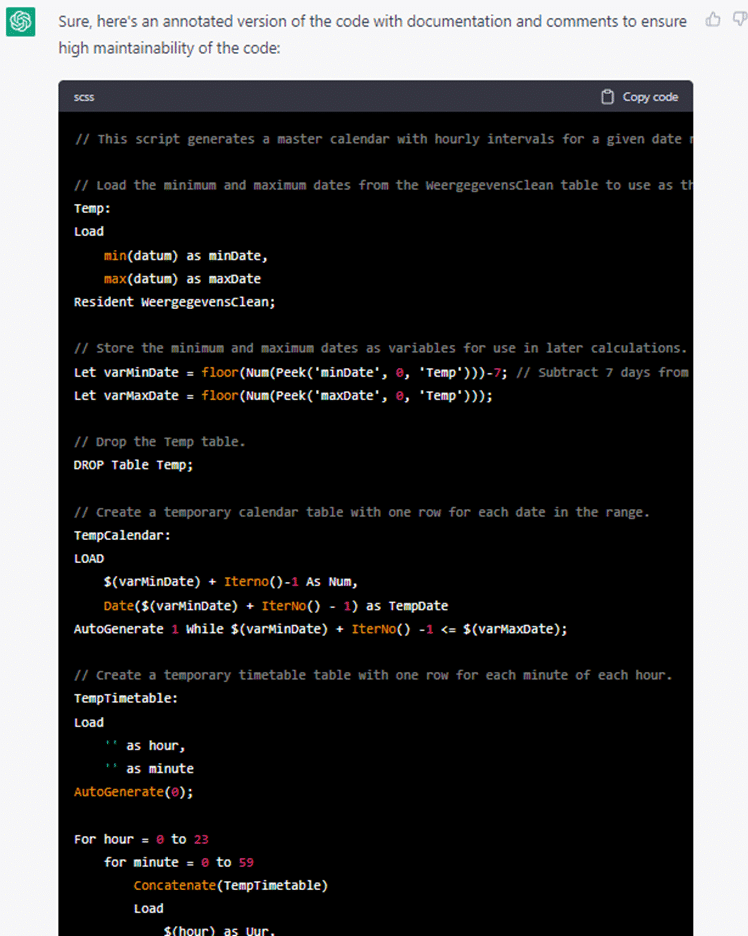
Another very powerful thing ChatGPT can do is explain a complex piece of code. The nice thing is that ChatGPT goes through the code line by line and tells you what is happening, after which it also summarizes what the whole thing produces.

Very handy when another developer hands you a brilliant piece of code that unfortunately is not well documented. Conversely, as a developer you can use ChatGPT to document your code and add comments to it (for the readability of this blog, we have cut the code out of the prompt in the screenshot)

Helping with debugging
Sometimes you have been staring for hours at a piece of script or an expression that returns an error. You just cannot figure out what the error message means or what you need to do to fix it. In that case, too, you can ask ChatGPT to help you:

The attentive reader will notice, by the way, that ChatGPT is also slightly misled here by the error message Qlik gives. It was not the "curly bracket" ( } ) that was missing, but the greater-than and less-than signs (< and >). The expression ChatGPT generated, however, was the correct one.
Identifying the right direction for a solution
You may be faced with a problem for which you do not immediately know a solution. Here too, ChatGPT can help you:

Helping choose a type of visualization
Sometimes it can be quite difficult to choose the right visualization. Here too, ChatGPT can help you make the right choice:

Interpreting data and data storytelling
If we are to believe the trend watchers, a large part of data storytelling will also be generated automatically in the near future. With ChatGPT, you can already get a head start on this. It is somewhat more complicated than using prompts as shown above, though. You will have to feed ChatGPT the data in some way so that it can interpret it. The most obvious way to do this is by using the ChatGPT API. Qlik Architect Jacek Harazin wrote a great article on LinkedIn about how this works.
In his article, Jacek himself notes a number of important caveats. For example, the version of ChatGPT that Jacek uses, model 3, is not very good at arithmetic. As a result, the totals and averages you see in the answer are sometimes not entirely correct. However, the new version soon to be launched by OpenAI, model 4, should be much improved in this respect.
It is also important to realize that you are sending your data to an external party. OpenAI promises not to store any data, but it is certainly not wise to send highly sensitive data. Of course, you can anonymize your data to limit the risks, although that will somewhat reduce the quality of the analysis.
Excited after reading this blog, but could you use some help with your Qlik environment? Get in touch with us using the button below and we will help you further.
Stay up to date
Don't want to miss a blog? Then sign up for our newsletter. That way, you'll receive all the latest content straight to your inbox every month. You can sign up using the button below.

Written by
