5 min read
A custom HR portal? Build it in Mendix

As an employer, you want to be able to look up all relevant employee information in one place. That's why almost all organizations have an HR portal. It helps you create an overview of all HR processes and serves as a place to keep track of all your employees' data. For employees, it's in many cases a personal environment in which they can submit matters related to their work, such as changing personal details or requesting vacation days.
Often, an off-the-shelf solution with standard functionalities is chosen for an HR portal. As a result, it's often not possible to include specific information or processes from your organization in this solution. This often leads to Excel files or other documents where employee information is kept alongside the HR portal. This is error-prone, and moreover, information can accidentally end up with people in the organization who shouldn't have access to it.
That's why at E-mergo we built our own custom HR portal in Mendix. In this blog, I list three handy features we developed for our own E-mergo HR portal. Features that might also be a valuable addition to your own HR portal.
1. Centralizing and validating your data
Employee data in an HR portal is often interdependent. Think, for example, of an employee who starts working part-time. Behind the scenes, this brings about quite a few changes. To process this change, you're dealing with linked calculations. It's therefore all the more important to be sharp about data entry and changes. If you keep information in different places, this naturally becomes more complicated.
With Mendix, you have the ability to centrally gather information from various sources, such as different business software. For example, we retrieve information from Exact via a (TimeXtender) data warehouse. When this information changes, the HR portal runs several validations to prevent incorrect data. Think of checks on the validity of the information and a check on whether the data can be combined correctly.
An added benefit is that with this functionality you can easily retrieve known data. For example, if you add a new employee to the HR portal, you can immediately view previously entered information based on an email address or employee number. This prevents duplicate entry of employee information.
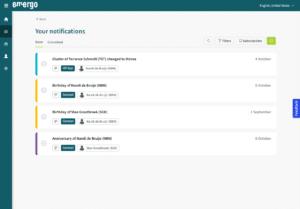
Image 1: Example of the E-mergo notification overview
2. Helpful notifications and reminders
As an HR employee, you have a lot to keep an eye on. Think, for example, of: changing data, new or expiring contracts, but also personal milestones such as birthdays and anniversaries.
In our HR portal, we've developed a helping hand for this. As soon as something changes or is about to happen, such as an employee switching departments, a contract about to expire, or someone's birthday coming up, a notification is created in the HR portal. In these notifications, you can specify the necessary follow-up steps, which will differ per type of notification. You also select who is responsible for which type of notification. This way, everyone immediately knows who picks up which task, and tasks don't sit unnecessarily long.
You can easily check off notifications once they've been handled. This way, you always keep an overview. If a task remains 'open' a bit too long, the responsible employee receives a reminder about it by email.
Image 2: You have the option to 'sign up' for a type of notification
Image 3: Employees can change their own address details
3. Employees can edit their own data
The E-mergo HR portal offers employees the ability to manage their own (private) data, such as an address, themselves. The portal has three types of user roles: HR, managers, and employees.
- The HR role is only for HR staff. They have access to all employee data.
- Managers can view a limited part of their team members' data and make certain work-related changes, such as department transfers.
- Employees can only view and (selectively) edit their own information in the HR portal.
When employees make changes, the HR team also receives a notification. This clearly states who made which change. With this self-service functionality, much more is also possible. For example, employees could enter their own leave days or submit an expense claim themselves. This eliminates unnecessary form-filling.
The benefits of an HR portal in Mendix
A custom HR portal in Mendix helps minimize errors through data validation, prevents unnecessary duplicate data entry, improves the overview of changes and open tasks, and increases efficiency because employees can update their own data. In short, it provides powerful tools to easily handle HR tasks.
Are you considering having a portal developed, or do you want to know more about the possibilities of an HR portal in Mendix? We're happy to help you with advice and think along with you about your specific situation. Contact one of our account managers for an introductory conversation.
Stay up to date
Want to stay up to date on all Mendix blogs? Sign up for our newsletter. This way you'll receive all the newest content directly in your mailbox every month. You can sign up via the button below.

Written by Lynn Gelderblom
Low-Code Consultant