6 min read
What Is Power Pages?

In our blog series, we cover all the parts of Power Apps one by one. In the final blog of this series, we take a closer look at Power Pages. Discover what Power Pages is, what you can achieve with it, and how it works together with other parts of the Power Platform.
What is a Microsoft Power Pages site?
Microsoft Power Pages is the newest addition to the Power Platform. Previously known as Power Apps Portals. Since its relaunch, it's a standalone part of the Power Platform. It focuses specifically on building external websites for customers, partners, and other external users. All data is stored in Dataverse tables. For example, the data of registered users is stored in the Contact table, and company data is stored in the Account table.
Microsoft Power Pages offers several components that can easily be added to extend the functionality of the website. A few important controls are:
- Text box: For adding textual information, such as instructions or descriptions.
- Forms: For entering and editing Dataverse data through forms, for example for registration or customer details.
- Lists: An overview of data, such as customer lists or requests, that can be filtered and customized.
- Media: For inserting images, videos, or other media files to make the site visually appealing.
- Card Gallery: A visual display of items in the form of Cards, suitable for presenting products or services.
- Power BI: For displaying interactive dashboards and reports within the website, so users have direct access to data insights.
- IFrame: This lets you embed external content or other websites within the Power Pages site for additional information or integrations.
With these controls, Power Pages sites can be set up to be user-friendly and visually appealing, tailored to the specific needs of the users.
What can you do with a Power Pages site?
With Power Pages, you can digitize complex processes and make them accessible through a secure, user-friendly website. Where Canvas Apps offer flexibility in designing an app and Model-Driven Apps focus on internal data management, Power Pages focuses on making that data and functionality accessible externally. This allows organizations not only to automate processes, but also to make them easily accessible to customers, partners, or other external users. To illustrate this further, I've listed a few Power Pages use cases:
- Volunteer portal: A non-profit organization can use Power Pages to manage and promote volunteer projects, where volunteers can easily log in to view detailed information about projects, requirements, and schedules. They can easily sign up, share their availability, and communicate directly with project coordinators. The platform offers automation such as confirmation emails and reminders, while volunteers can track their progress and share achievements. Through Power Pages, organizations can issue personalized certificates and efficiently manage and analyze volunteer data via integration with Microsoft Dataverse.
- Partner portal: A partner portal built with Power Pages gives an organization's partners easy access to important documents, project statuses, and collaboration tools. By keeping these documents in a central location, customers and partners can quickly find data such as contracts, reports, and project updates. The portal doesn't just make access to important documents easier, it also offers a secure, modern space for collaboration.
- Customer service portal: Companies can use a Power Pages site to give customers access to self-service options. Think of submitting support tickets, tracking the status of requests, and viewing other pages such as frequently asked questions (FAQ). Support tickets are entered by customers in one central place and land in one central place with customer service. Customers can also find answers to their questions without having to submit a ticket for it.
Role within Power Apps/Power Platform
Power Pages sites offer a great solution for creating external web portals aimed at customers, partners, or suppliers. Power Pages sites offer built-in support for security and permissions, making it easy to manage access based on roles. In addition, all data is stored securely in Dataverse tables. Finally, it's also possible to create Progressive Web Apps.
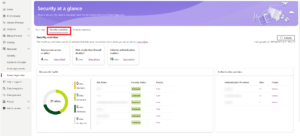 Use the Power Platform admin center to see how secure the websites in your tenant are.
Unlike Canvas Apps, which focus on specific tasks, and Model-Driven Apps, which support complex business processes, Power Pages focuses on creating interactive sites for external users. They're scalable and flexible, growing with the needs of the organization and the site.
How do Power Pages sites work together with the Power Platform?
Power Pages work seamlessly with the other parts of the Microsoft Power Platform. By integrating these components, powerful and valuable solutions can be built. Below are a few examples of how Power Pages works together with other Power Platform components:
- Dataverse: Power Pages uses Dataverse as its data store. All data collected via a Power Pages site is stored securely in Dataverse tables. This data can easily be managed and shared with other Power Platform solutions.
- Power Automate: With Power Automate, processes within a Power Pages site can be automated. Think of automatically sending emails, approving requests, or triggering automated flows as soon as users submit data through the site.
- Power Apps: Both Canvas Apps and Model-Driven Apps can work together with Power Pages. Canvas Apps can be displayed directly within Power Pages sites. This way, external users can use interactive forms or specific functions, such as placing orders or entering data.
- Model-Driven Apps share the same Dataverse data source as Power Pages. This means complex business processes managed internally through Model-Driven Apps can easily be made accessible externally via a Power Pages site.
- Power BI: Power BI reports and dashboards can be integrated directly into Power Pages. This makes it possible to present real-time insights and analyses to external users, so they always have access to up-to-date data.
-
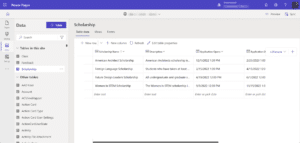
Makers can create and customize Dataverse tables directly in the design studio via the Data workspace.
Limitations of Power Pages
Although Power Pages offers a lot of possibilities, there are some limitations. The design options are limited if you don't have much knowledge of HTML, CSS, or JavaScript. For complex functionality, development experience with tools such as Visual Studio Code is necessary. Integrations outside the Power Platform require extra configuration of APIs. In addition, the licensing model can be costly, especially with many external users or large volumes of data.
Conclusion
Power Pages is a versatile solution within the Microsoft Power Platform, ideal for building secure, scalable web portals for external users such as customers, partners, and suppliers. With built-in support for Dataverse, Power Automate, Power Apps, and Power BI, it offers extensive capabilities for data management, process automation, and data visualization.
Although the design options without custom code are limited and complex functionality requires development experience, the standard components make it easy to quickly build professional websites. Power Pages helps organizations make their internal processes accessible externally, allowing collaboration and data exchange to run smoothly.

Written by Mathijs van der Ven
Low-Code Consultant