9 min read
Everything you need to know about Power BI

Power BI is one of the most popular Business Intelligence tools around right now. The software has a large fan base, so it's no surprise that Gartner names it a Leader in its Magic Quadrant report time and time again. But if you're not familiar with Power BI, all of this probably means very little to you. In this blog, we explain what Power BI is and everything you can do with it.
What is Power BI?
Microsoft Power BI is essentially an umbrella term for a range of cloud-based apps and services that make it easy for organizations to organize, manage and analyze their data.
In short, Power BI collects your data, processes it and turns it into data visualizations that you can use to generate insights. That makes Power BI a true Business Intelligence tool. The tool lets you connect to a variety of internal and external, online and offline data sources, such as ERP and CRM systems, Excel, Google Analytics and Facebook.
Why use Power BI?
The search for the right Business Intelligence tool often starts because you are running into problems with your current way of working. Perhaps your organization currently does everything in Excel, which means the data isn't up to date and it's often hard to keep track of all those different documents. On top of that, working in Excel is a manual and time-consuming process. In that case, Power BI could be the solution.
With Power BI, you automate that entire process. Your data lives in just one place, which means there is only one version of the truth. You're no longer bogged down by a flood of Excel documents and can find all your information in one place. This lets you focus more on generating insights. Want to know more about why Power BI is a better BI tool than Excel? Then read our blog ‘7 reasons why Power BI is a better BI tool than Excel’.
Power BI is also one of the fastest-growing BI platforms available today. Microsoft releases monthly updates, so improvements are continuously added to the tool. In addition, Power BI has been a market leader in the Gartner Magic Quadrant for Analytics and Business Intelligence Platforms for 14 years.
What can I do with Power BI?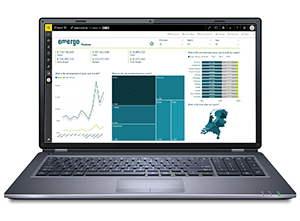
Power BI offers a wealth of possibilities when it comes to Business Intelligence. For example, the tool makes it easy to create reports and generate insights based on your data. Power BI also lets you connect numerous data sources and ‘clean’ them, so the information you unlock can be processed and understood more easily.
Power BI also helps you not only see what happened in the past and present, but also make estimates about the future. The tool comes with numerous Machine Learning capabilities, which means it can recognize patterns in your data and use those patterns to make predictions about the future. This also allows the tool to run “what if” scenarios. With these estimates, you can generate forecasts and prepare yourself to answer future questions and meet other important metrics.
Of course, there is much more you can do with Power BI. For example, you can integrate the tool in various ways into your other Microsoft 365 products, such as Microsoft Teams. Within Microsoft Teams, you can use Power BI reports and present them during a meeting, for instance. You can read more about this in our blog ‘6 ways to use Power BI in Teams (incl. how-tos!)’.
You can also use Power BI in combination with Power Automate. Both Power BI and Power Automate are part of the Power Platform, which brings a number of attractive benefits. For example, Power Automate lets you fully automate certain processes and functions in Power BI. You can read more about this in our blog ‘Power BI & Power Automate’.
How do I use Power BI?
When you get started with Power BI, there are several ways to approach it. First of all, Power BI is generally a cloud-based tool. This means your data and reports will be entirely online. That doesn't mean you can't work on-premises with Power BI, though. Power BI has a separate service for this: Power BI Report Server. This service is available with a paid Power BI subscription: Power BI Premium. You can read more about the license types later in this blog.
You also need to decide whether to get started with Power BI yourself or work with a third party, for example. Power BI is an extremely user-friendly tool that is, of course, free to begin with. You only start paying once you want to use more functionality.
The advantage of working with a third party is that you can draw on specialist knowledge and literally have your worries taken off your hands. Together, you look at what your organization needs and how Power BI can meet those needs. It's also possible, of course, to work with a third party that only helps out now and then. You can read more about this on our consultancy page.
Components of Power BI
Power BI consists of various programs and elements that all work together. Below are the three basic components:
- A Windows desktop application called Power BI Desktop (read more in this blog about getting started with Power BI Desktop). Power BI Desktop is a free application that you can install on your computer.
- An online SaaS (Software as a Service) application called the Power BI service. This application is used entirely online via the browser. The Power BI service is often used to share reports and dashboards.
- Power BI mobile apps for Windows, iOS and Android devices.

In addition to the three above, Power BI also includes Power BI Report Builder, for creating paginated reports that you want to share in the Power BI service, and Power BI Report Server. This is an on-premises report server where you can publish your Power BI reports after creating them in Power BI Desktop.
Power BI versions and licenses
As you briefly read above, Power BI comes in different versions and licenses. Below, we briefly explain what they are and what they do. Want to know more about the different Power BI license types? Then read our blog ‘How do Power BI licenses work’.

Power BI Desktop
Besides being Power BI's desktop application, Power BI Desktop is also Power BI's free license. You can already do quite a lot with this free license, but it has 1 major drawback: you can't share your reports and dashboards with other users.
Power BI Pro
Power BI Pro is the first paid version of Power BI. With a Power BI Pro license, you pay per user. This license gives you the same basic features as the Power BI Desktop license, with 1 big difference: with a Power BI Pro license, you can share your reports and dashboards with other users.
Power BI Premium
The most comprehensive license type currently available is Power BI Premium. Since April 2021, the Power BI Premium license has been split into two licenses: Power BI Premium Per User (PPU) and Power BI Premium Capacity. The main difference between the two is that Power BI Premium Per User is purchased per user, while the Power BI Premium Capacity license is purchased based on capacity. Read more about this in our blog ‘New: Power BI Premium Per User’.
Power BI Report Server
Power BI Report Server is a feature you get with a Power BI Premium Capacity license. It allows you to keep all your data in an on-premises environment. Your data stays local and does not go to the cloud.
Power BI Embedded
Power BI Embedded is a Microsoft Azure service that lets you quickly embed data visualizations, reports and dashboards in an app. With this license, you can share your dashboards and reports with users who only have a free license.
The Power Platform
Power BI is part of the Power Platform, an umbrella term for a number of tools that together make it easier to automate business processes. The Power Platform consists of the following components: Power BI, Power Apps, Power Automate and Power Virtual Agents. You can read more about these components in this blog.
How do I get started with Power BI?
Has this blog made you enthusiastic about Power BI, and do you want to get started yourself? Every month, E-mergo offers a free Power BI Basics training. During this online training, you'll discover how Power BI works and how to make the most of it. After the training, you'll know the basic principles of Power BI and can start using the tool. You can sign up using the button below.
Want to learn a bit more about Power BI before you start? We've written a blog about the 8 things you should know before you start with Power BI. You can read the blog via the button below.
Free Power BI Basics trainingBlog
The Golden Triangle
Although Power BI also lets you collect and manage your data, using a cloud platform such as Azure and a data management platform such as TimeXtender is a lot more convenient and faster, especially when dealing with larger datasets. At E-mergo, we are therefore convinced that if you use Power BI as your Business Intelligence tool, you can create an ideal combination of BI, cloud and data warehouse tools. This combination consists of Microsoft Power BI, Microsoft Azure and TimeXtender, and we call it the ‘golden triangle’. Read the blog about the Golden Triangle via the button below.
The Golden Triangle
Stay up to date
Don't want to miss a blog? Then sign up for our newsletter. You'll receive all the latest content straight to your inbox every month. You can sign up using the button below.
