6 min read
What is a Model-Driven App?

In our blog series ‘Discover the building blocks of Power Apps’, we cover all the components of Power Apps one by one. In the previous blog in the series, we talked about Canvas Apps. In this blog, we take a closer look at Model-Driven Apps. Discover what a Model-Driven App in Power Apps is, what you can do with it and how it works together with other components of the Power Platform.
What is a Model-Driven App in Microsoft Power Apps?
Model-Driven Apps are part of Microsoft Power Apps. They are a type of application within Power Apps.
Microsoft first introduced Model-Driven Apps in 2018. With Model-Driven Apps, everything revolves around the data model and the underlying structure of the data. A Model-Driven App can only use Dataverse as the data source for the application.
Want to develop a Power Apps application with a data source other than Dataverse? Then read our blog about Microsoft Canvas Apps; with this type of app, you can use any of the 1,000+ connectors.
A Model-Driven App consists of, among other things, a sitemap, views and forms. These are standard components that are always available:
- Sitemap: The sitemap forms the navigation structure of the application. It determines which selections and tables are accessible to users.
- Views: These are predefined views that present data in a list or table format. Users can quickly browse through items, and the views can be customised to show specific columns or filters.
- Forms: Forms are used to view and edit the details of a specific item.
Forms and views are generated automatically for every table in Dataverse. This is a standard layout. New forms and views can be created in the Dataverse table that are fully tailored to users' expectations. Want to know more about Dataverse? Then read the blog: what is Dataverse?
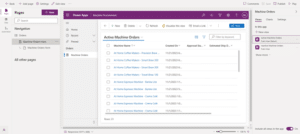
The Model-Driven App Designer makes it easy to build apps with components such as dashboards and forms.
What can you do with a Model-Driven App?
With a Model-Driven App, you can digitise and automate complex processes. Where Canvas Apps offer design flexibility, Model-Driven Apps take a more data-driven approach, with the focus on structuring and managing data. To illustrate this further, I have listed a few Model-Driven App use cases:
- Customer management (CRM): For companies that want to manage their customer interactions in a single system, a Model-Driven App can be the answer. The app can help keep track of customer data, sales opportunities and service requests. This makes it possible to bring customer interactions and documentation such as quotes and sales contracts together in one app.
- Customer service: In many organisations, customer interactions such as questions, complaints and requests are often handled through different channels, such as email, phone or separate documents. This can lead to confusion and delays in the response process. A Model-Driven App can offer a solution, because all customer interactions can then be recorded in one system. This makes it possible to quickly assign customer questions to the right employees, track progress, send automatic reminders and set up updates.
- Inventory management: For companies that want to manage their stock from purchase to sale, a Model-Driven App can help keep track of stock levels, orders and deliveries. For example, we built a Journal Catalogue for SURF. This Model-Driven App stores and processes all data related to publication negotiations. Read more about this case here.
- Compliance and risk management: For many organisations that have to comply with government regulations and risk requirements, reporting on and adhering to these guidelines can be a time-consuming and difficult task. Audits carried out manually often have to be processed separately and then combined into a single overview. A Model-Driven App can offer a solution here, allowing you to centralise all audits and compliance data in one system. By creating different forms, all types of audits can easily be carried out and stored in the app. The stored data can easily be exported from the app whenever needed.
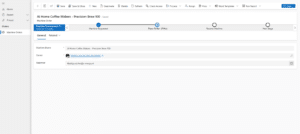
With Model-Driven Apps, data is entered in a standardised way, supported by smart underlying logic.
Role within Power Apps
Model-Driven Apps are suited to complex applications and challenges. They provide a standardised user experience by generating the interface automatically based on the data model. Model-Driven Apps also offer built-in support for workflows and business rules. Workflows let you automate tasks from the app, and business rules let forms adapt dynamically based on specific conditions.
Where Canvas Apps focus on one specific task and Power Pages targets external users, Model-Driven Apps are designed to automate and improve entire business processes.
How do Model-Driven Apps work together with the Power Platform?
Model-Driven Apps work seamlessly with the other components of the Power Platform. By integrating the different components of the Power Platform, you can build valuable solutions. Below, I have listed a few examples (per Power Platform component):
- Dataverse: Model-Driven Apps always use Dataverse for data storage, which is why the two work together so well. All data, forms and views are stored centrally in these Dataverse table(s).
- Power Automate: Power Automate lets you automate processes within a Model-Driven App. These can be Power Automate flows that make changes based on a certain status, or flows that run at the click of a button.
- Power BI: Power BI can be integrated into Model-Driven Apps to display dashboards and reports. You can add a Power BI report or dashboard to a Model-Driven App.
- Power Pages: A Model-Driven App can be part of a Power Pages site by connecting to the site's Dataverse tables. Requests or applications submitted via the Power Pages site can be viewed and assessed in a Model-Driven App, enabling seamless processing of external requests.
Limitations of Model-Driven Apps
Alongside all the benefits and possibilities Model-Driven Apps offer, there are also some limitations. Model-Driven Apps always require a Dataverse database, which means users need a Power Apps Premium licence. In addition, there are limited options for customising the UI (User Interface) and UX (User Experience). In some cases, this makes the applications less intuitive and user-friendly.
Conclusion
Model-Driven Apps stand out because they are strongly data-driven and focus on managing complex business processes. Thanks to their connection with Dataverse, they are ideal for organisations that work with large volumes of data and many different tables. Model-Driven Apps are the perfect choice for organisations that want to automate and work more efficiently. They are robust and scalable, and can leverage integrations with other Power Platform tools such as Power Automate, Power BI and Power Pages for further automation and reporting.
Stay up to date
Want to stay up to date with all the ‘Discover the building blocks of Power Apps’ blogs? Sign up for our newsletter and receive all the latest content straight to your inbox every month. You can sign up using the button below.

Written by
